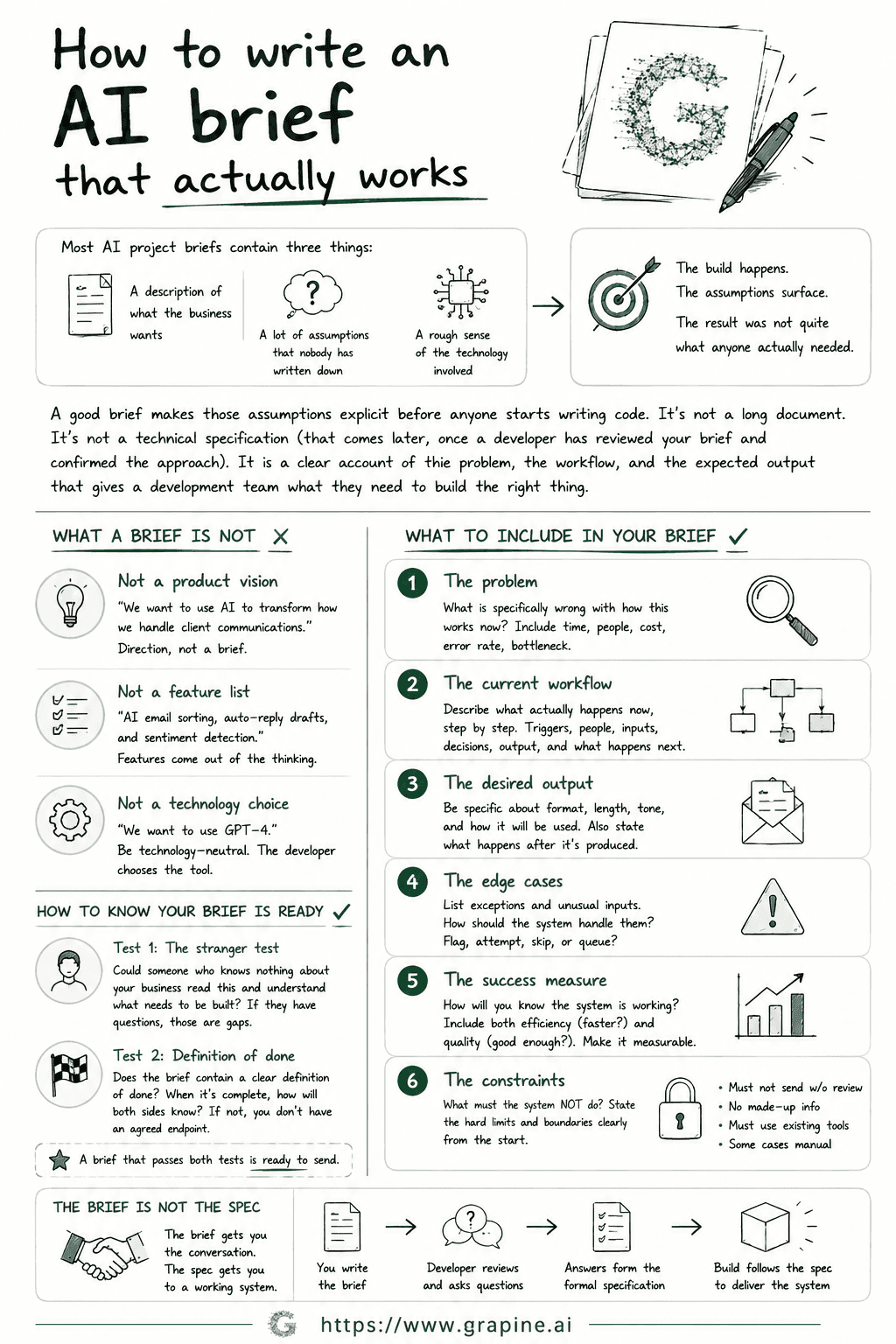
Most AI project briefs contain three things: a description of what the business wants, a rough sense of the technology involved, and a lot of assumptions that nobody has written down.
The build happens. The assumptions surface. The result was not quite what anyone actually needed.
A good brief is the document that makes those assumptions explicit before anyone starts writing code. It is not a long document. It is not a technical specification (that comes later, once a developer has reviewed your brief and confirmed the approach). It is a clear account of the problem, the workflow, and the expected output that gives a development team what they need to build the right thing.
This post covers what goes in one. It applies whether you are working with Grapine or anyone else.
What a brief is not
Before covering what should be in a brief, it helps to clear what should not.
A brief is not a product vision. "We want to use AI to transform how we handle client communications" is a direction. It is not a brief. A developer reading it does not know what the system should do, what it should receive as input, or what it should produce.
A brief is not a feature list. "AI email sorting, auto-reply drafts, and sentiment detection" describes features. A good brief describes the workflow and the change you want to make to it. Features come out of that thinking. They are not the starting point.
A brief is not a technology choice. "We want to use GPT-4" is a vendor preference. A brief should be technology-neutral: what the system needs to do, not which tool should do it. The developer makes that call once they understand the problem clearly.
With that said, here is what actually belongs in the document.
1. The problem
Not "we want AI to help with emails" but: what is specifically wrong with how this works now?
How much time does the current process take? How many people are involved? What is the error rate, or the quality issue, or the bottleneck? What does it cost to do this the way it is currently done?
A clear problem statement does two things. It helps the developer understand what they are solving for. It also gives both sides a reference point when the build is complete: did this solve the problem it was supposed to solve?
Weak: "Our team spends too much time on email."
Strong: "Three account managers spend around two hours each per day drafting client status update emails. The emails follow a consistent structure but are written from scratch each time. We want to cut this to under 30 minutes per person per day without reducing the quality or personalisation of the emails."
The difference is specificity. The stronger version contains enough information to design around.
2. The current workflow
Describe what actually happens now, step by step. Not at a high level but in real detail.
What triggers the process? Who does it? What do they look at, read, or receive before they start? What decisions do they make in the middle? What do they produce at the end? Who receives that output and what do they do with it next?
This is the section most briefs skip or write too vaguely. It is also the most important. An AI system replaces or supports a workflow. Without understanding the workflow in detail, the developer is guessing at what to automate.
A useful test: give your workflow description to someone who has never seen this process. Can they follow it? If they have questions, those questions are gaps in your brief.
3. The desired output
Describe what the AI system should produce. Be specific about format, length, tone, and what the output will be used for.
"A draft email" is not specific enough. "A draft email of three to five sentences, written in the same tone as the examples attached, addressed to the client named in the input data, summarising the three status points provided, ready to send with minor editing" is specific enough to build from.
Also say what happens to the output after it is produced. Does a person review it before anything is sent? Does it go directly somewhere? Does it populate a field in another system? The answer changes how the system needs to be designed.
4. The edge cases
Every workflow has exceptions. The input that arrives in a different format. The situation where the standard approach does not apply. The case that only comes up twice a month but matters a lot when it does.
Edge cases are where AI systems most commonly fail in production, because they are the scenarios the development team did not know to anticipate. List the exceptions you are already aware of, and say how the system should handle them.
Is it acceptable for the system to flag unusual inputs for human review rather than processing them? Should it attempt to handle them and note the uncertainty in the output? Should it skip them entirely and add them to a queue?
You will not catch every edge case before the build starts. But covering the ones you already know about reduces the surprises that appear after it launches.
5. The success measure
How will you know the system is working?
This should be specific and measurable. "The team finds it useful" is not a success measure. "Account managers spend under 30 minutes per day on status emails, measured over 30 days after launch, with no decrease in client satisfaction scores" is a success measure.
Include both sides of the equation: the efficiency measure (is it faster?) and the quality measure (is the output good enough to use?). A system that saves time but produces output the team has to rewrite from scratch has not succeeded, even if it is technically functional.
If you cannot write a success measure, it usually means the problem statement needs more work. The two are connected.
6. The constraints
What must the system not do? What are the hard limits?
Constraints are often easier to articulate than requirements, and they are just as important. Common ones worth stating:
- The system should not send anything to a client without a person reviewing it first
- The output should only contain information present in the input (no AI-generated assumptions about the client)
- The system must work within the tools the team already uses (say which ones)
- Certain categories of client or case should always be handled manually, regardless of system output
A developer who knows the constraints at the start can design around them. A developer who discovers a hard constraint halfway through a build has to redesign. The cost of writing constraints into the brief is much lower than the cost of discovering them during or after development.
How to know your brief is ready to send
Test it in two ways before sharing it with a development team.
First: could someone who knows nothing about your business read this brief and understand what needs to be built? Not a developer. A smart person with no context on your industry or your systems. If they have questions after reading it, those questions are gaps that need filling before the brief goes out.
Second: does the brief contain a clear definition of done? When the build is complete, how will both sides know? If that sentence is not in the document, the project does not have an agreed endpoint, and handover will be a negotiation rather than a confirmation.
A brief that passes both tests is ready.
The brief is not the spec
One clarification worth making: the brief is the starting point, not the final document a developer builds from.
Once a developer reviews a good brief, they will ask follow-up questions. Those questions produce answers that go into a formal specification, which is the document the build actually follows. The brief gets you to that conversation. The spec gets you to a working system.
If you want to understand how the spec process works in more detail, this post on spec-first building covers it.
If you have a brief ready and want to know if it is specific enough to build from, you can send it to Grapine and we will review it within 48 hours. We will tell you what is there, what is missing, and whether it is ready to move to scoping.